LinkedIn headshot tips: 5 checks before you upload
LinkedIn headshot tips as five checks: likeness, face size, being alone, background and light, tried on 4 AI headshots from three photos.
AI headshots vs a photographer: dated prices, a recruiter survey, a studio headshot beside AI output from three casual photos, and where a photographer wins.
AI headshots vs a photographer comes down to one test for a LinkedIn thumbnail: does the picture still look like you? If it does, an AI headshot may be enough. Book a photographer when you need a high-resolution file, a press or brand shoot, a team set in one style, or someone to direct you. Below: dated prices for both (and for our own LinkedIn headshots recipe), what recruiters said in one survey, a studio headshot beside what our recipe returned from three casual photos, and where each option fails. We did not hire a photographer for this post, and we say below what that means for the comparison.
Key takeaways
In the US, Thumbtack's cost guide puts the average at $304, with a typical range of $216 to $427 (Thumbtack, headshot prices, page updated 2025-01-22, checked 2026-09-26). Prices vary by city, the length of the session and how many retouched files you get. Studios and event photographers also set their own rates, so treat the Thumbtack figures as a midpoint, not a quote.
Time is the other cost. A photographer means finding and booking one, getting to a session, then waiting for the edits. We have no figure for that wait and will not invent one.
AI headshot packs sell a bundle of generated photos for a one-time price. Both vendors below were checked on 2026-09-26:
MultiAngle works differently. The LinkedIn headshots recipe turns one photo into 4 shots for 4 credits. The Free plan gives 4 credits on the 1st of each month (UTC), which covers one run, and paid plans start at $19/month. Downloads are no watermark, with commercial use on every plan, Free included. See MultiAngle pricing for the plans.
| Photographer | AI packs (HeadshotPro, Aragon) | MultiAngle recipe | |
|---|---|---|---|
| Price (checked 2026-09-26) | $304 average, $216 to $427 typical (Thumbtack) | $29 to $75, one-time | 4 credits per run; 4 free credits a month |
| What you give them | A booking and your time | Photos, per the vendor | One photo |
| Number of images | Set by the session | 30 to 100, by tier | 4: Studio · Classic, Studio · Turned, Office and Outdoor |
| What you control | Pose, expression, outfit, with a person directing | Choice among many looks | Which of 4 looks to use |
| Turnaround | Scheduling, the session and editing | See the vendor | We have not timed this recipe |
| Best for | Brand, press, team shoots, high-resolution use | A wide choice of outfits and backgrounds | A fixed set for a profile photo |
The packs offer many more shots, outfits and backgrounds than MultiAngle's 4, and that choice is a real advantage. If you want to pick from fifty looks, a pack fits better.
Some can. The only recruiter data we found is a vendor survey, so read it with that caveat. Ringover surveyed 1,087 recruiters in June 2024 (Ringover, "AI headshots", checked 2026-09-26):
76.5%
preferred AI headshots in a blind set
39.5%
spotted the AI headshot
88%
said AI use should be disclosed
66%
put off if they recognise it as AI
These numbers cut both ways. Recruiters often preferred the AI pictures, and many still wanted to be told, and some were put off when they recognised one. The survey is from 2024, run by a vendor, and about AI headshots from tools in general, not MultiAngle's.
What LinkedIn itself requires is narrower. Its Help page says "Your profile photo must reflect your likeness" (LinkedIn Help, checked 2026-09-26). It names no method. So the deciding question for any headshot is whether it looks like you, and the self-check is cheap: show the original and the new picture to someone who knows you and ask which is which. Our LinkedIn headshot tips: five checks before you upload cover the rest, and the AI headshots guide explains how the technology works.
A fair comparison would show one person both ways, and we could not do that. We have no photographer's headshot of any person who has agreed to appear in this post, so we cannot show one face shot both ways. What we can show is two separate things: what a studio-style headshot looks like, and what our recipe returned from three casual photos. They are of different people. Nothing below compares one person's likeness across the two methods.
The photographer's side. For an example of a studio-style headshot we used a free stock photo on Unsplash by Joseph Gonzalez. It shows a man in a white V-neck against a grey, veined backdrop. The light is warm and comes from the front, the backdrop is soft and out of focus, and both eyes carry a ring-shaped highlight. We know nothing about who took it, with what gear, whether it was shot in a studio or whether it was retouched. It is not a photo of anyone in the AI outputs, and the man in it is not a customer, user or tester of MultiAngle.
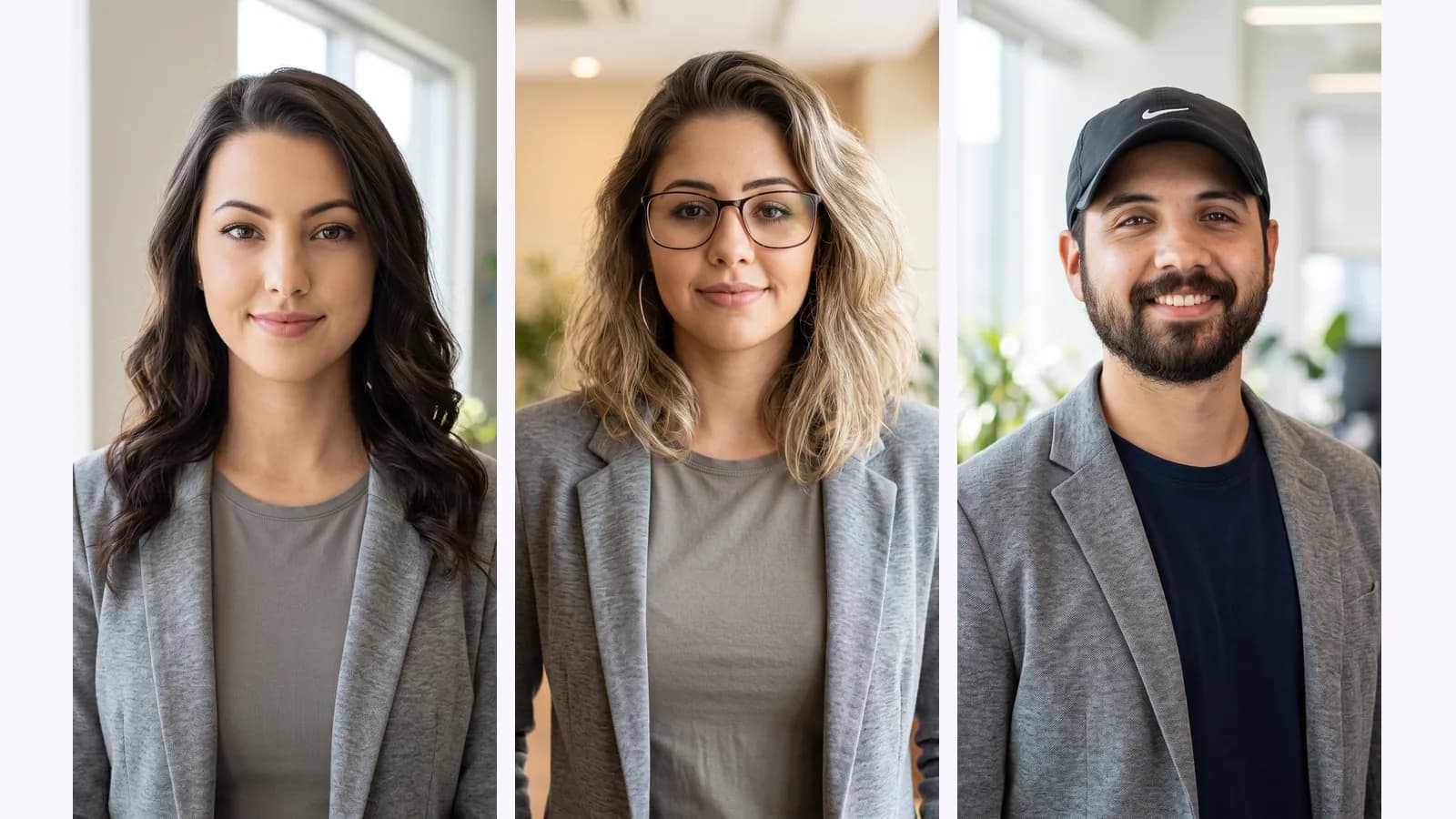
The AI side. Our inputs were not selfies. They were three casual but well-made portraits from Unsplash, also of people in free stock photos whom we do not know: a woman laughing outdoors, a woman in glasses leaning on her hand, and a bearded man in a cap turned three-quarters in front of a red wall. We ran each through the recipe once, with the default outfit setting, Business casual. The recipe's upload screen says that by uploading you confirm the photo is you and that you are 18 or older. These runs were demonstrations on stock photos; upload only yourself. If you are in one of these photos and want it removed, tell us and it goes.
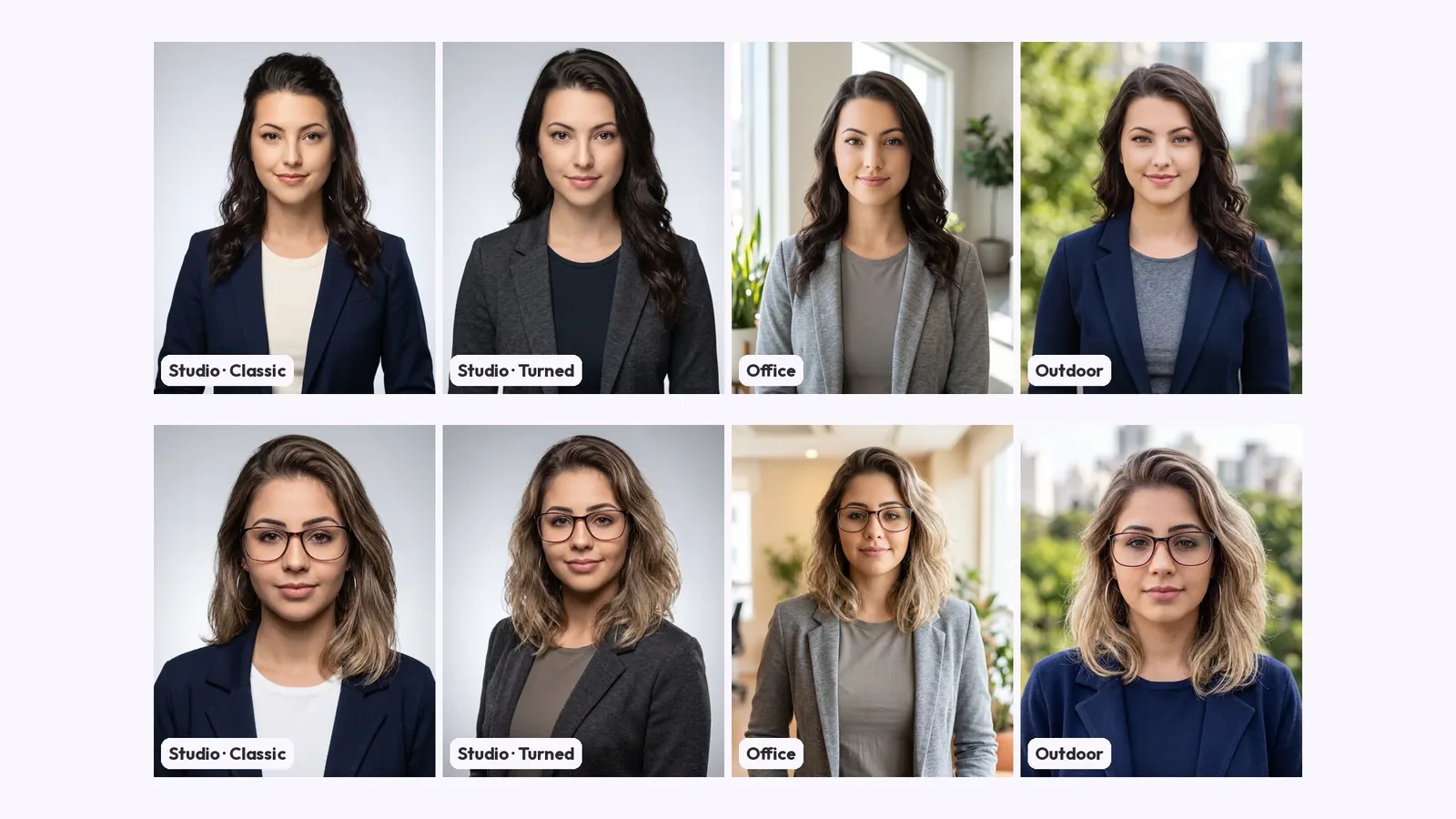
The recipe returned Studio · Classic, Studio · Turned, Office and Outdoor for each.
What we see across all of them. Every output swaps the casual outfit for a blazer over a plain tee. The two studio looks put the person in front of a plain, even, pale grey backdrop. The stock example's grey backdrop is darker, veined and out of focus. Office and Outdoor use generated blurred scenes, not the person's real surroundings. Studio · Classic is the one we would start from as a profile photo in all three runs, on plain background and even light alone. Studio · Turned was the one with the hardest light in photo 3, with a shadow down one side of the face. More on picking and checking the background: LinkedIn headshot background: which one to choose.
At 100% around the eyes, the studio photo shows grain and pores across the forehead, fine lines at the eyes, and a small ring-shaped highlight in each pupil. The Studio · Classic output from photo 3 has pores, fine lines at the eyes and individual beard hairs, and a small bright highlight in each eye, with less grain than the studio file. The outputs from photos 1 and 2 are smoother: little pore texture across the forehead and cheeks in photo 1, and a lightly smoothed face with strong, tidy lashes in photo 2. Teeth in the photo 3 output have a plausible shape and count at this size. We saw nothing that looked broken at 100%, and several faces looked more polished than the studio photo.
Smooth is not the same as real. Whether a recruiter reads smooth skin as polish or as a tell is the question the Ringover numbers above are about, and we cannot answer it from three images.
Look hard at these before you use any AI headshot, ours or anyone's:
What we saw. We do not know these people, so "likeness" means how close each output looks to its input photo to us, nothing more.
MultiAngle's own limits: the recipe makes 4 looks from one photo and no more, you cannot pick your own outfit, pose or background, and you cannot edit a single headshot afterwards (Improve exists only on Room angles and Product turnaround). A photographer can take a hundred frames and direct each one.
A photographer is the better choice when:
If none of those apply and you want a photo for a profile, an AI headshot checked against the original is a fair option.
For more on the upload, see how MultiAngle works. Account and credit questions are in the FAQ, and the full set of guides is under AI headshot guides.
Photo credits: the studio example is by Joseph Gonzalez; the AI outputs were made from photos by Michael Dam, Vinicius Wiesehofer and Luis Villasmil. All four photos are on Unsplash.
LinkedIn's rule is that your profile photo "must reflect your likeness" and it removes stock imagery, celebrities and fictional characters (checked 2026-09-26). We found no rule on AI itself on that page. A headshot that looks like you meets the rule whichever tool made it.
In one vendor survey, yes in a blind test: 76.5% of 1,087 recruiters preferred the AI headshots. The same survey found 88% wanted AI use to be disclosed and 66% were put off when they recognised one (Ringover, June 2024, checked 2026-09-26). Treat it as one data point, not a verdict.
For MultiAngle's recipe, one. Other tools ask for more, so check each vendor's page.
MultiAngle gives commercial use on every plan, Free included. LinkedIn's own rules on what a profile photo may show still apply.
4:5 portrait (1600×2000) and 1:1 (1200×1200), as JPEG or PNG files.
More on this topic: AI LinkedIn headshots from one selfie and AI Headshot Guides for LinkedIn.
LinkedIn headshot tips as five checks: likeness, face size, being alone, background and light, tried on 4 AI headshots from three photos.
LinkedIn headshot background guide: plain or blurred, which colour to pick, what the circle crop hides, and what AI studio, office and outdoor looks showed.
Children's book character consistency: build a model sheet before page one, check each spread against anchor features, and use an AI turnaround as reference.