Products · Generate
Product turnaround template
One product photo in, 8 views out: front, 3/4 left, 3/4 right, left side, right side, back, above and below. What to upload, what each view is for, what a set costs and where the results slip.
What to upload
The Product turnaround template works from one photo of one product, and everything it generates is read off that photo. Your upload is also the front view of the set, so only 7 of the 8 views are generated.
The app's own upload checklist and examples come down to four things:
- One product per photo, whole and centred, with nothing cropped at the edges.
- Even, diffused light, so the colour and the finish read clearly.
- A plain, uncluttered backdrop. Anything else in the scene gets mixed into the other angles.
- A sharp photo. Soft detail cannot be rebuilt.
Reshoot a cluttered or blurry photo before you generate. Every generated angle spends credits (1 credit = 1 image), so a second shot against a plain wall is cheaper than regenerating a set.
The 8 views and what each is for
A set is fixed: front, 3/4 left, 3/4 right, left side, right side, back, above and below. You can generate all of them, start from a suggested set or pick exact angles one by one, but you cannot ask for a view that is not on the list. It is a fixed set of angles, not a free-form camera.
- Front, 3/4 left and 3/4 right. The frames most listings lead with. The front is your own upload.
- Left side and right side. What a buyer turns a product over to check: a handle, a spout, a clasp, a seam.
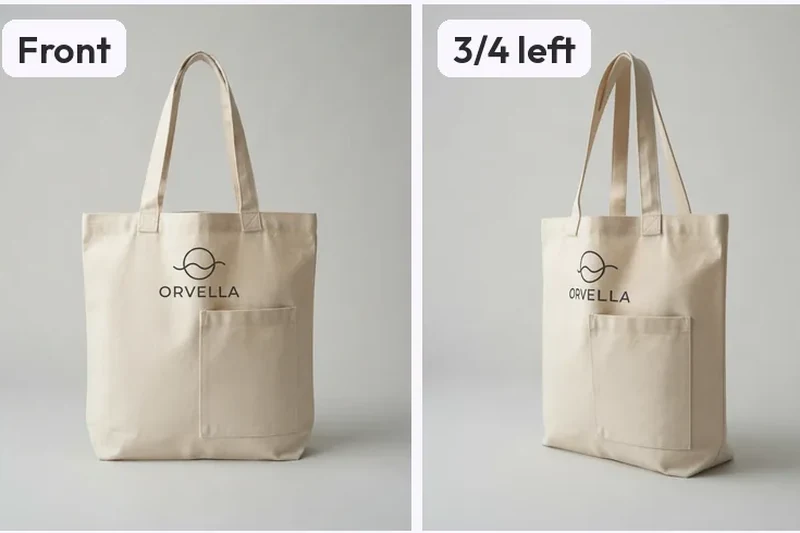
- Back. The side your photo never showed, so it is the model's guess and not a copy. On the canvas tote in our gallery the back carries a logo and a pocket the input never showed.
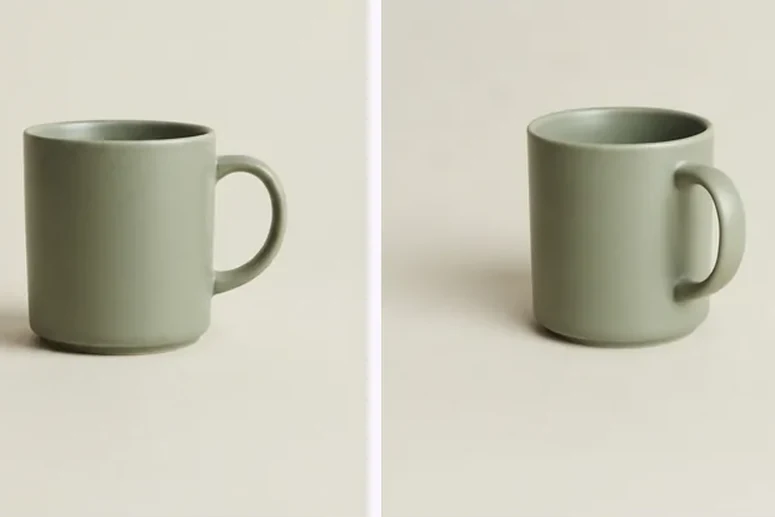
- Above and below. Useful for shape and as reference. The Below view is a low angle, not a look at the underside: on the mug it comes back close to level, and on the sneaker the sole is still not shown.
What a set costs and what you get
Credits are the unit (1 credit = 1 image), so a full set is 7 credits at one variant per angle. The Free plan gives 4 credits a month. The Free credits cover a full virtual staging set, or part of an angle set. Creator is $19/month for 100 credits, Pro is $59/month for 350 and Studio is $149/month for 950.
Downloads are PNG, JPEG and WebP, plus a ZIP of the set, with no watermark. You get commercial use on every plan, Free included. Output is 1K on Free and Creator and 2K on Pro and Studio. Paid plans also add the prompt field, and Improve (edit one angle) on Room angles and Product turnaround.
Where a set slips, and how to check it
These notes come from the product sets we have published, not from a test of every product. Shape, material and colour hold well: the mug's handle and glaze, and the sneaker's leather, sole and laces, read as one object in every view. The weak spot is anything small and printed. On the sneaker the logo is redrawn as a different mark on the 3/4 and above views, and on the tote the logo is cut off where it wraps round the edge.
Before a set goes on a listing:
- Zoom into every logo, label and line of text and compare it with the real product.
- Follow one-sided details such as a handle or a pocket from view to view. A handle should swap sides on the back view, not wander.
- Treat the back and the Below view as guesses, and check them against the real thing.
- If one view is wrong, regenerate that angle on its own. The rest of the set stays as it is.
When another page fits better
- A marketplace listing needs a pure white main image and lifestyle scenes: use the Product photoshoot for Amazon listings, which makes the white main image plus up to 8 scenes from one photo.
- Every product template, and the jobs they do, are on the Products page.
- For a plain-language introduction read AI product photography, and for the shots a listing needs, our guide to product photography angles.
- For more sets like these, browse Products in the gallery.
Real examples
Real sets from our guides.
MultiAngle output and the checks we run on it, from our published guides. Each card says what it is.
Templates
Explore other Products templates
360° Spins
Coming soon. Smooth, consistent frames for an interactive 360° spin.
 Stock photo
Packshots
Coming soon. Clean, e-commerce-ready packshots on a seamless background.
 Stock photo
Background Swap
Coming soon. Drop your product onto any background, lighting matched.
 Stock photo
Relight
Coming soon. Re-light the same shot — soft, hard, warm, or cool.
 Stock photo
Lifestyle Sets
Coming soon. Place your product in styled, on-brand lifestyle scenes.
 Stock photo
Worlds
Explore Other Worlds
Pick the world that fits your work — products, avatars, or environments — and jump straight into the matching template hub.
Templates
Browse by style & use case
Resources
Related guides
Product Photography FAQ
Common questions.
Quick answers about Product Photography.
One photo of one product, whole and centred, sharp, in even light on a plain backdrop, with nothing cropped at the edges. Clutter in the scene gets mixed into the other angles, and soft detail cannot be rebuilt.
8 fixed views: front, 3/4 left, 3/4 right, left side, right side, back, above and below. Your upload is the front view, so 7 are generated. The views are a fixed list, not a free-form camera.
Not reliably. In the sets we have published, shape, material and colour held, but a small logo was redrawn on some views and another was cut off where it wraps round the edge. Compare every logo and line of text with the real product before you publish.
A full set is 7 credits (1 credit = 1 image). The Free plan gives 4 credits a month. The Free credits cover a full virtual staging set, or part of an angle set. Creator is $19/month for 100 credits.
It varies with load, so we don't promise a time. The analysis runs first, then the angles render in parallel, so the set fills in as they finish.
Yes. MultiAngle.ai includes commercial use on every plan, Free included, so you can use results in listings, ads, and other commercial work.