Amazon image requirements 2026: main vs secondary
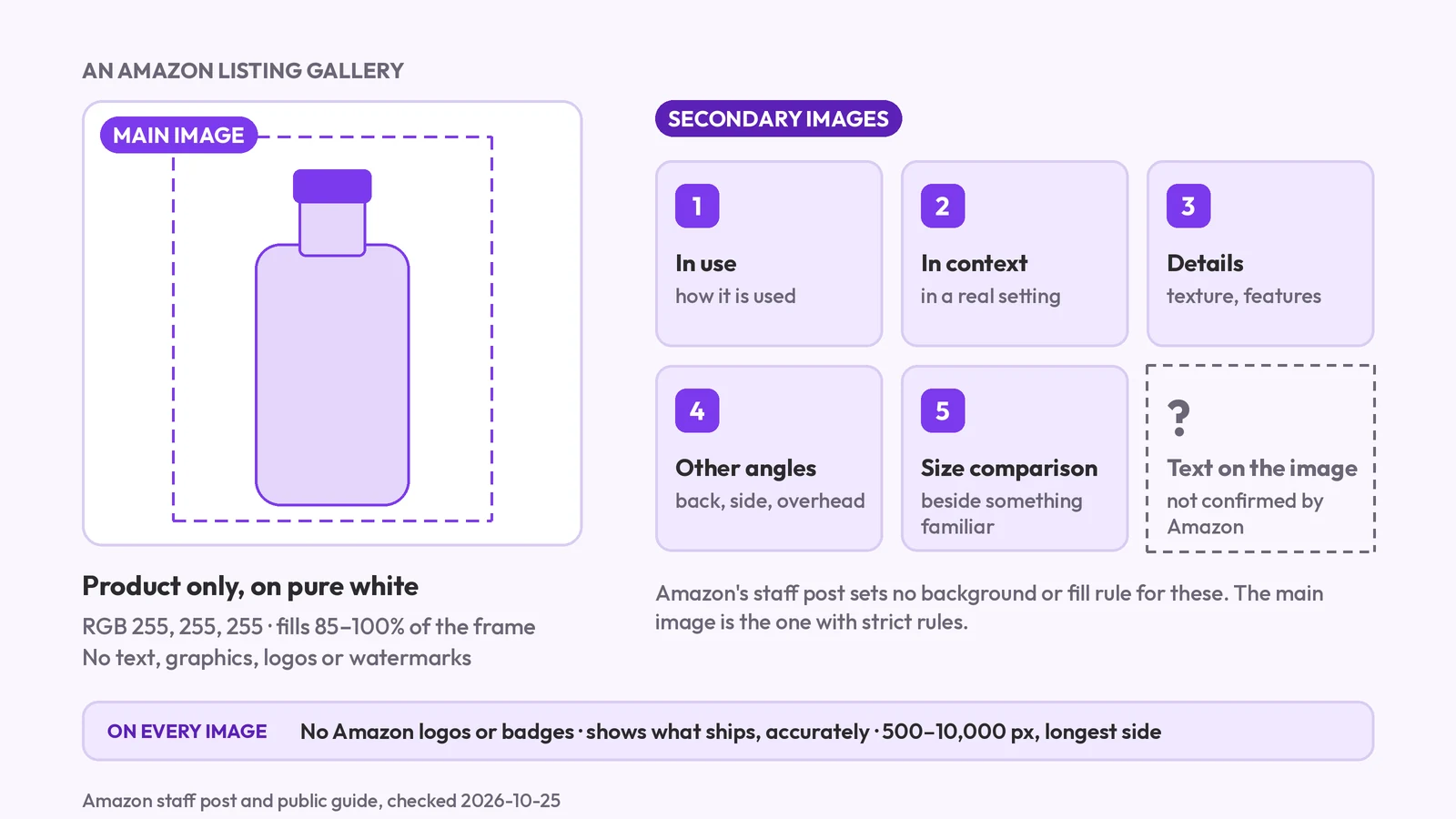
Amazon's main image must be pure white with no text; secondary images are looser. What each slot may show, the AI-people tag, and what we couldn't confirm.
Amazon lifestyle images explained: the in-use, styled and scale scenes, whether AI scenes are allowed, the AI-people tag, and how to check the label survived.
Amazon lifestyle images are the secondary listing images that show a product in a real setting: in use, styled in a scene, or beside familiar objects for scale. The main image stays on white. We found nothing in Amazon's public guidance that bans AI-made scenes, but the product has to stay accurate, and a photorealistic AI person needs a metadata tag.
Key takeaways
contains-synthetic-performer tag.Lifestyle images are the secondary images on an Amazon listing that put the product in context. They typically show it in use, styled in a scene, or next to everyday objects so the shopper can judge its size. The main image has its own strict rule, a pure white background, and lifestyle images don't have to follow it.
Amazon's guide for sellers recommends at least six images per product and lists the shots that work, including closeups and 45-degree shots (Amazon, "6 tips for taking product photos", dated 2024-12-04, checked 2026-09-26). It doesn't give a number for lifestyle images in particular. The rest of the set is covered in Amazon product image requirements, and the white-background rule for the first image is in how to pass the main image check.
Product photoshoot for Amazon listings makes the white main image and scenes like these from one photo. The scenes in this post came from the earlier Amazon listing set flow, which we tested in September 2026; the section on how to make them now covers what the Product photoshoot does. More guides in this series are under Amazon listing guides.
Yes, with one rule that matters. We found no ban on AI-made images as such in Amazon's public guide or in the staff reply we read. What the staff reply adds is a metadata tag: since June 6, 2026, any photorealistic person who is entirely AI-generated must carry the contains-synthetic-performer keyword in the image's XMP dc:subject field.
The staff reply covers all buyer-facing media: listing images, A+ Content, Brand Story, Store images and video (Amazon Seller Forums, checked 2026-09-26). According to the same reply:
A question in the same forum thread asks whether the requirement applies only to media uploaded after July 23, 2026. We haven't confirmed the answer, so read the thread before you rely on the date.
The product itself has to match what ships. G1881, Amazon's product image guide in Seller Central, is the canonical rule page, and it needs a sign-in (G1881). We couldn't read it, so check it for any rule on AI imagery.
Most buyer questions are covered by the product in use, the product styled in a setting, and the product beside familiar objects for scale. Each answers one thing a shopper would otherwise guess. The earlier Amazon listing set had three lifestyle slots, and they make a good checklist for any scene: in use, styled and scale.
| Scene | The buyer question it answers | Risk | How to check |
|---|---|---|---|
| In use | How do I use it? | An invented hand or person (tag), or an accessory that isn't included | Any person is tagged or absent; nothing shown that doesn't ship |
| Styled | What does it look like at home? | Colour or finish drifts to suit the scene; text on the label changes | Zoom on the label and logo; compare colour with your photo |
| Scale | How big is it? | Object sizes read wrong, so the size misleads | Check the product against the real dimensions on the listing |
The scale shot can mislead. A wrong sense of size is a return, so check the objects beside the product against the dimensions in your listing, not by eye. We also ran a small earbud case, further down, because its real size is easy to misjudge. To show size with numbers on a secondary image, see how to make a size chart image.
Here is one run of the earlier Amazon listing set flow, tested in September 2026. We gave the app a single front image of an amber dropper bottle with a made-up label, FERNLEAF, made with Google's Nano Banana (it is not a photo of a real product) and uploaded at 800 px.
Of that set's slots, five came back and two did not. The 45° and from-above shots were refused with "We could not draw this angle without changing your label, so this shot is refunded," and were not charged. The styled shot failed once with "The scene moved your product out of place" (refunded) and came back on a retry.
What each shot shows:
No person appears in any of these three shots, or in any shot from the earbud run later in this post. We haven't confirmed whether the earlier flow could ever add a person, so look at every image you get.
Not always as accurate as they look. Photoroom, a vendor of editing tools, published a benchmark of 850 fashion products run through four general image models: the best model kept the product's details in 29.0% of cases, with logo and text distortion in 20.1%, missing elements in 12.5% and pattern changes in 11.4% (published 2026-07-06, Photoroom benchmark, checked 2026-09-26).
That is a vendor's test of general models on fashion, not a test of this recipe. It is still the right warning: a convincing scene can quietly change a logo or a label. We ran our own check on one bottle with small printed text.
We compared these crops by eye. The FERNLEAF wordmark, the fern icon and the line NET VOLUME: 30 ML match the input in all three scenes, and so do the shape of the bottle, the cap and the bulb. The two ingredient lines are where the scenes drift. The input's fine print was already imperfect: the first letter of each line is smeared, and the last word starts TOO and is garbled. In all three scenes those spots are smeared further, and the second line's first word (DRYOPTERIS in the input) no longer reads clearly. The rest of the ingredient text still reads the same. Because the input's own fine print was already imperfect, this test cannot say how a clean label would have fared.
What changed is size. In the in-use and scale shots the label is about 190 px wide in a 2,000 px file, and the ingredient text is roughly 6 px tall. It is only readable when you zoom in on the file; a buyer on the listing page will not read it. In the styled shot the label is about twice as wide, and the text reads. If your selling point is on small print, make the scene show the label large.
No scene changed the wordmark, the icon or the volume line, but none kept the ingredient lines exactly as they were in the input. The styled shot needed a retry earlier in the run, and two other shots were refused outright because the app would not redraw the label from a new angle.
The earbud case is where scale goes wrong. The scale shot puts the case between a mug and a pencil, with a pair of glasses beside it. The case keeps its shape, its lid line, its slot and its small green light. But judged by eye, and by the violet lines on the figure, the case is about as tall as the mug and about as long as the pencil (the pencil lies at a slight angle, so that match is rougher), so the picture suggests a large object. An earbud case of this style is typically only a few centimetres across. Nothing in our input told the scene how big the case really is, and the objects were not sized to match. If you use a scale shot, write your real dimensions in the listing and compare.
The earbud run also showed an edge problem that the bottle did not. In the in-use and styled shots, a thin dark dotted line runs around the edge of the case, strongest at the corners. The line is thin enough that you would miss it on a listing page and see it when you zoom in, and it looks like a cut-out placed on a scene. We did not confirm how the earlier flow built its shots. The Product photoshoot pastes the real product back in from your photo, so zoom in on every edge.
The styled earbud shot has one more oddity: the plinth the case stands on changes tone halfway across its face, a lighter textured left half and a black right half.
Our own angle test on other products is in where AI drifts across 20 products, and the checks above are part of the fidelity test for AI product photos.
Several tools make lifestyle scenes, and some of them fit your job better than ours. Amazon's own tool is aimed at ads, and two vendors offer many themes and bulk runs. The Product photoshoot works on one product at a time. Dates below are when we checked each page, 2026-09-26.
If you need many themes, bulk runs or an ads workflow, one of those fits better. MultiAngle's Product photoshoot runs one product at a time, with scenes picked four ways: Picked for you, Match a look, Explore ideas and Make your own.
These limits come from our September 2026 run of the earlier flow, plus what still applies to the Product photoshoot.
Upload one clear front photo of the product on a plain surface and open the Product photoshoot for Amazon listings. A run returns the white main image plus up to 8 scenes. Each scene is an AI picture with your real product pasted back in from the photo, picked four ways: Picked for you, Match a look, Explore ideas and Make your own. Explore ideas is a library of 51 licensed scene photos. It costs 1 credit per image, and your first Product photoshoot set (the white main image plus 4 scenes) is free, once per account. You also get one free redo per scene image. See plan prices and credit costs for what a top-up costs. The recipe has changed since this test: see how the current Product photoshoot works.
Check every lifestyle image against the steps above before you upload it. Amazon's review decides what passes. If you also want every angle of the product for the gallery, the product turnaround template makes 8 views from the same photo. For a wider look at the approach, see our AI product photography guide.
Make Amazon lifestyle scenes from one photo
According to the Amazon staff reply we read, yes: a partly visible person, such as a hand, needs the contains-synthetic-performer tag if it is photorealistic and AI-generated. It isn't needed for real people, fictional or non-photorealistic characters, or images with no people (checked 2026-09-26).
We have no listing data. The only figure we can cite is Amazon's own, "+10.3% higher ROAS on Sponsored Brands" for ads using AI-generated images (Amazon Ads, checked 2026-09-26). That measures ads, not listing images, so it doesn't tell you what a lifestyle image does on a product page.
We couldn't confirm that from a public source. The rule on added text for secondary images is in G1881, which needs a Seller Central sign-in, so check it there. A label printed on the product itself is different: it has to stay accurate, which is why the label check above matters. The main-vs-secondary rules, and what we could not confirm, are in Amazon image requirements 2026.
Amazon's public guide doesn't set a number for lifestyle images. It recommends at least six images in total, and the Product photoshoot makes the white main image plus up to 8 scenes, scenes included. Add each extra scene only if it answers a question a buyer would otherwise ask.
More on this topic: Product photoshoot for Amazon listings and Amazon Listing Image Guides.
Amazon's main image must be pure white with no text; secondary images are looser. What each slot may show, the AI-people tag, and what we couldn't confirm.
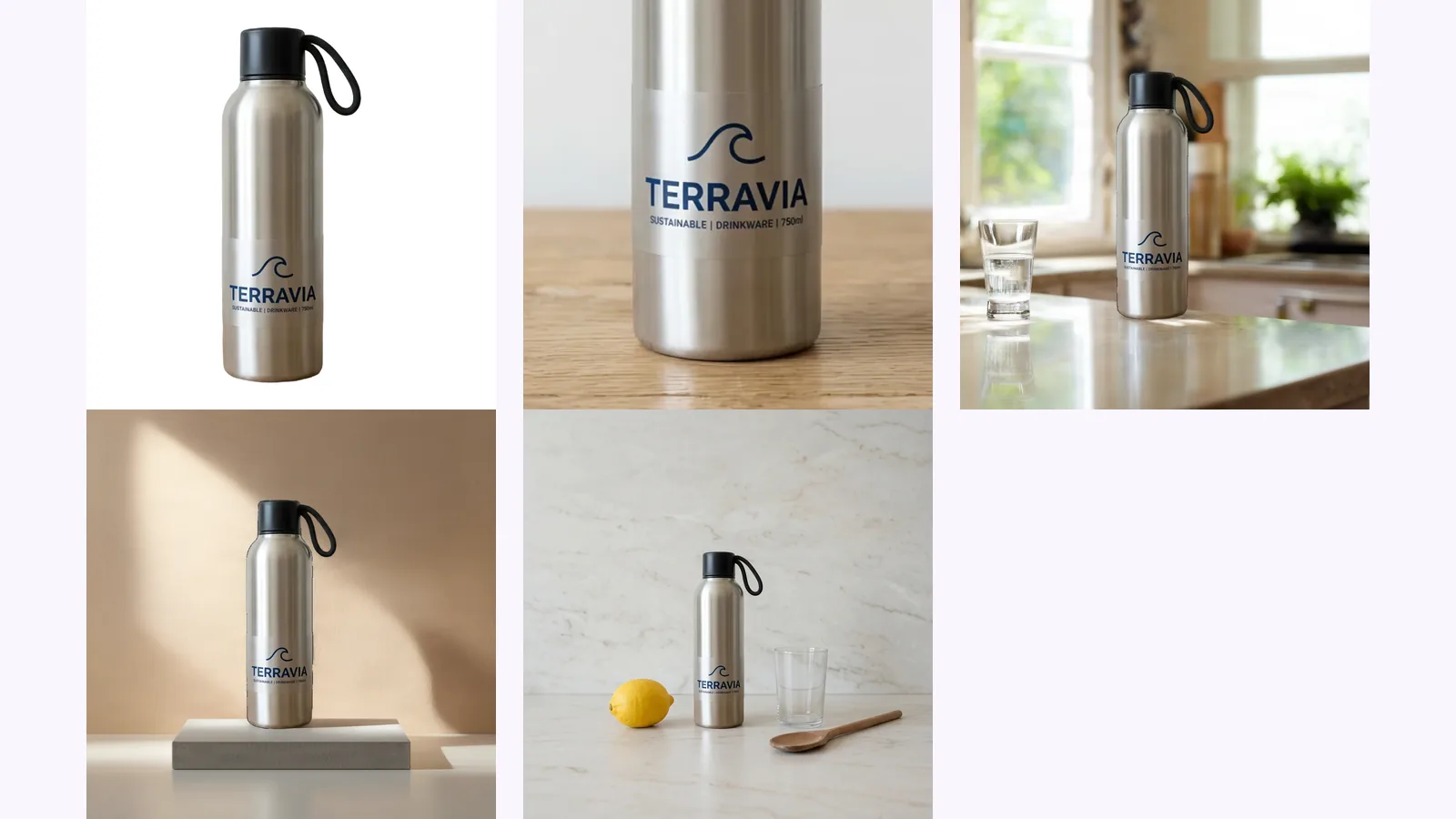
Amazon's image rules, quoted from Amazon and dated: 500–10,000 px, RGB 255 white, 85% fill, how many images a listing needs and the AI-people tag.
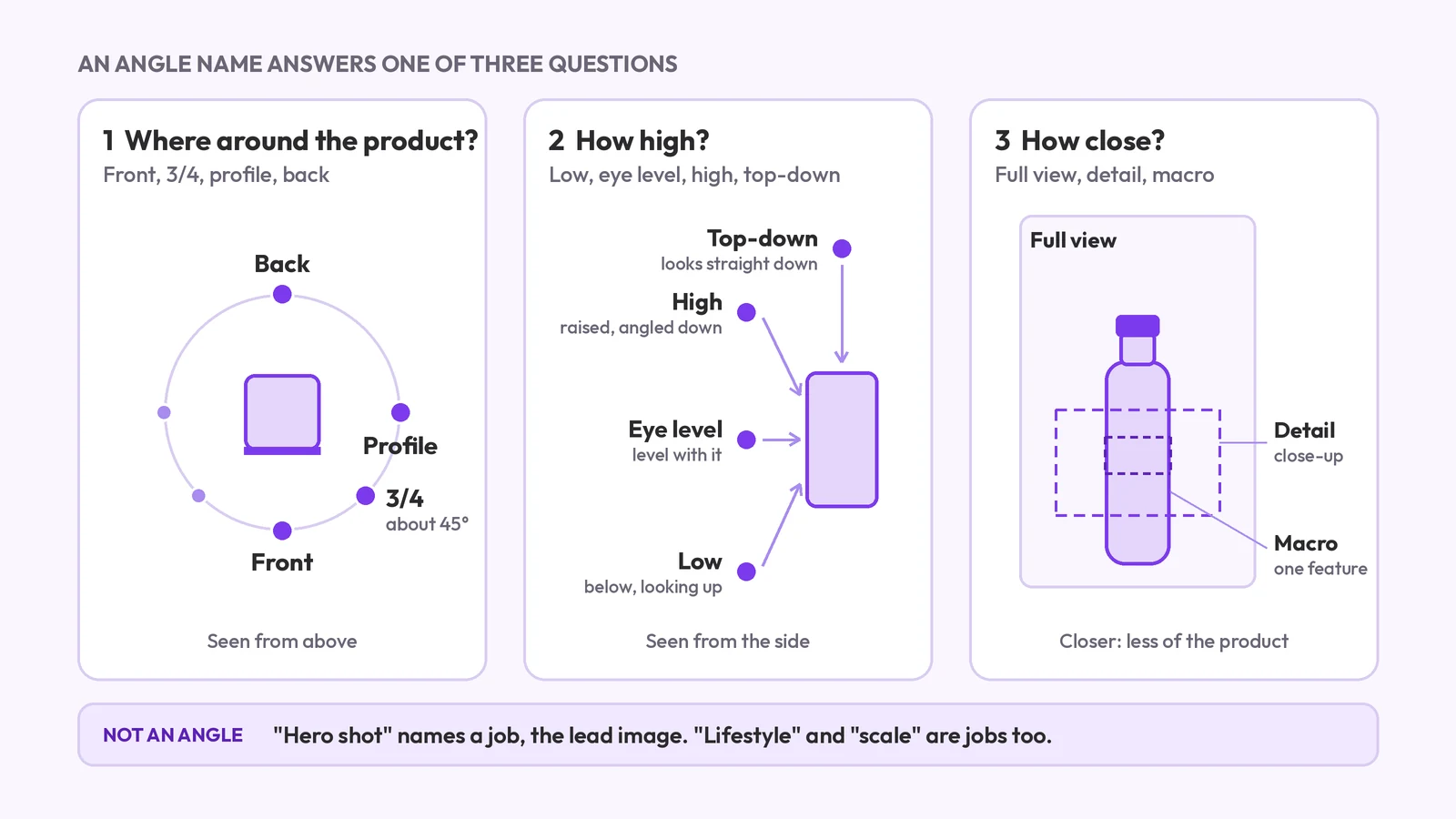
Product photography angle names: front, 3/4, profile, back, high, low, top-down and detail. What each means, which products need which, and what a set covers.