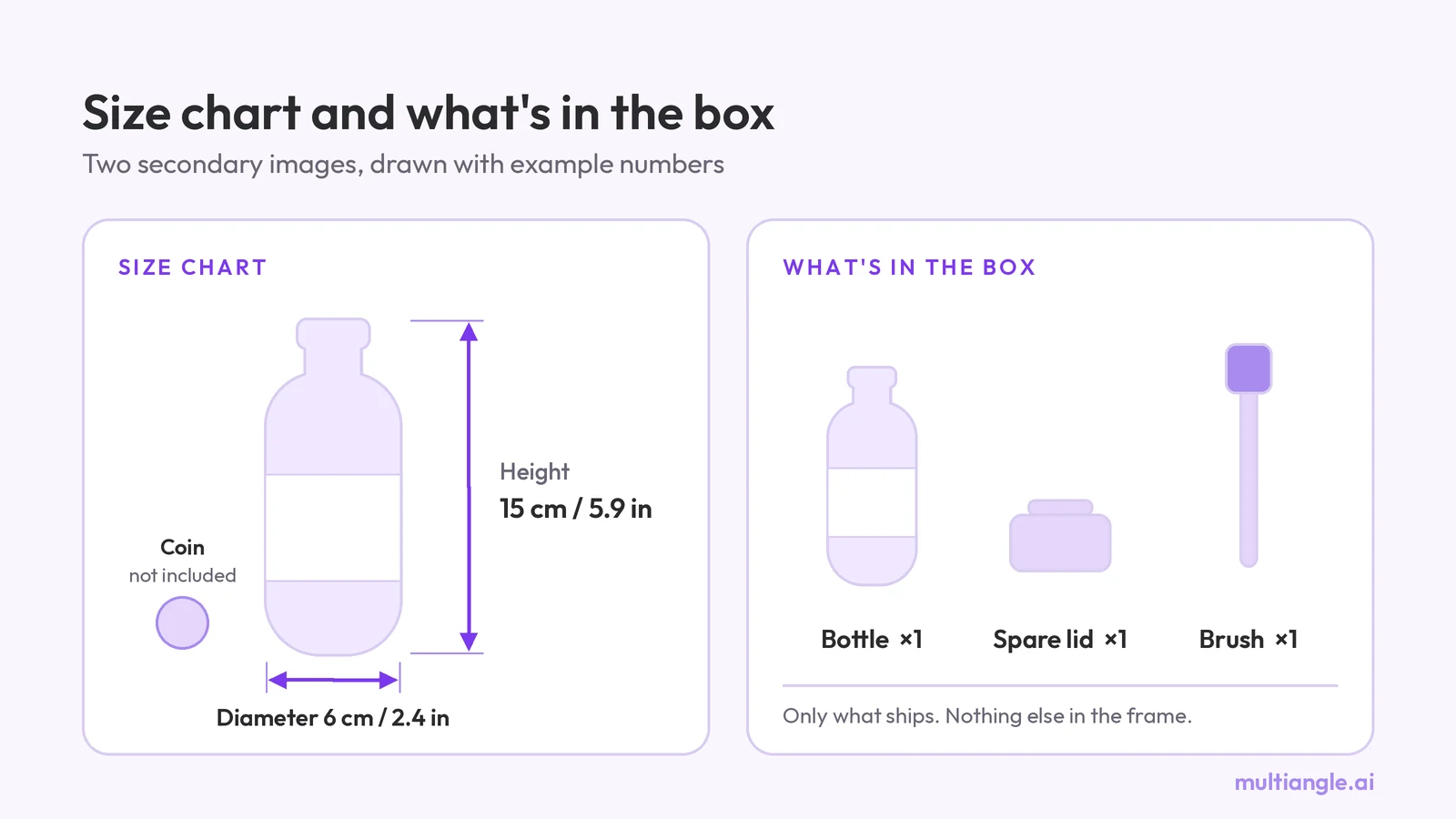
Amazon size chart image and what's in the box image
Amazon size chart image and what's in the box image: what to measure, cm and inches, how to label each, and what Amazon's own posts say to show.
Amazon wants a pure white main image, RGB 255. How to check yours with an eyedropper, fix an off-white background, and shoot a white product on white.
An Amazon main image needs a pure white background, RGB 255, 255, 255, with the product filling 85% or more of the frame. A background that only looks white can fail, because the rule is written in pixel values. This post shows how to measure yours with a free eyedropper, what a suppression notice says, and how to handle a white product on white.
Key takeaways
Amazon's guide for sellers asks for a main image on pure white, RGB 255, 255, 255, with the product filling 85% or more of the frame and the file over 1,000 px on its longest side so zoom works. The full rule list sits behind a Seller Central sign-in, so this post separates what Amazon states publicly from what seller guides add.
What we could check, with the date we checked it (2026-09-26):
The other rules for the full set, such as pixel limits and the secondary images, are in Amazon product image requirements. If you want a white main image and listing scenes from one photo, Product photoshoot for Amazon listings makes both, and more guides on listing images are under Amazon listing guides.
The rule is written in pixel values, so a background that looks white to the eye but measures 245 or 250 does not meet it. Amazon's notice names the problem outright, and the forum threads we found show sellers hitting it with ordinary phone photos.
A seller posted the notice on the Seller Forums (Europe): "We believe the main image has non-pure white background which is not permitted for this product type…" (Seller Forums EU, checked 2026-09-26). The staff reply there says reaching RGB 255 "requires photo-editing software".
Why a photo falls short: background-removal vendors such as remover.bg say a camera records white as roughly 240 to 250, not 255 (vendor claim, checked 2026-09-26). Window light, a paper sheet and a phone's auto-exposure all pull the background a little grey. We found no published tolerance in the public sources above, so the safe target is 255, not "close".
We ran this image through the eyedropper test. None of the four paper points came close to 255. They read from R 177 G 184 B 199 to R 218 G 226 B 241, and the paper leans blue: at all four points the blue reading sits 21 to 24 above the red. We also counted pixels across the paper area, and not one had all three channels at 250 or above. The paper looks white at a glance, and its red channel sits 37 or more below 255. The mug reads R 190 G 199 B 206 on its lit side and R 113 G 109 B 105 in shade. That scene is a Nano Banana image of a desk in soft window light, so it may read darker than a real phone photo, and the vendors' 240 to 250 may be the milder case. The lesson is the same either way: look at the number, not the screen.
Open the file in an editor with a colour picker that shows RGB values, click the background in all four corners and once right beside the product's edge, and read the numbers. Every reading should be 255, 255, 255. A threshold view then shows any patch that isn't pure white.
Treat the threshold as a quick screen and the eyedropper readings as the check. Amazon doesn't publish how its own check reads the file, so measure the whole background, not just the corners.
On the input, the threshold turned every pixel black: not one pixel in the frame was exactly 255. On the main image, 47% of the pixels were exactly 255, which is the whole background including the opening in the handle, and the mug is a black silhouette, as it should be. The silhouette has a ragged fringe along its edge. Those are pixels at 252 to 254 that sit next to the mug, which is normal and invisible at full size. A few more sit away from the mug: about 2,500 pixels, 0.3% of the frame, read 252 to 254 and lie more than 6 px from the mug, most of them in and around the handle's opening. The eyedropper points we picked there read 255, so a handful of eyedropper clicks would not have found them. That is the reason to run the threshold view as well. Neither is Amazon's own check, which Amazon doesn't publish.
Keep a soft contact shadow directly under the product and a clear edge between it and the background, and never add an outline or border. A white product on pure white can look like a white square, which is the complaint sellers raise on the forums, so the edge needs a little definition.
One seller's thread puts the problem plainly: "If I put them on a pure white background my listing photo will just be a white square" (white vinyl decals, Seller Forums, checked 2026-09-26). Amazon staff answered a similar thread that the guidelines allow "minimal shadows around the product", and that borders, frames and outlines are not allowed (Seller Forums, "Pure White Product, White Background Requirement", checked 2026-09-26).
So the fix is not a drawn line. It is contrast: a slightly angled lamp or a lower exposure on the product so its edge reads against the white, then a clean white background behind it. That is photography advice we have not tested against Amazon's check.
Our input was a white mug on white paper, and it was not a clean setup for a main image: the scene also had a wooden desk, a plant and a window. The app said so on that input: "Other items are visible. Amazon's main image shows only what the buyer receives." We ran it through the earlier Amazon listing set flow (tested in September 2026) anyway and kept only the main image.
The file is 1,000 by 1,000 px. The four background points read R 255 G 255 B 255, and so did every one of the 4,000 pixels along the border. The mug came back light grey, not white: R 186 G 194 B 200 on its lit side, R 115 G 115 B 119 in shade. That grey is what keeps its edge visible against the white, which solves the white square problem here. The edge is clean and slightly soft, as the close-ups under Where it fails show. It has no outline, and nothing else is in the frame.
Yes, a light one. Amazon staff say the guidelines allow "minimal shadows around the product" (Seller Forums, checked 2026-09-26). The sources we read disagree on how much counts as minimal, and Amazon doesn't publish a limit, so keep it soft and only under the product, never as a grey patch on the wall behind it.
In our mug main image there is no shadow at all. Every pixel from the bottom of the mug down to the frame edge, 84 rows, reads 255. We did not test whether a flat, shadow-free image looks floating on a listing page, and we don't know whether the earlier flow added a contact shadow for other products.
Most failures are one of eight, each visible with the eyedropper or at a glance. The first six are measurable from Amazon's public guide and staff replies; the last two come from seller guides that summarise G1881, so confirm them there.
| Failure | How to spot it | Fix |
|---|---|---|
| Off-white background (looks white, reads below 255) | Eyedropper reads under 255 at a corner or edge | Fill the background with 255, 255, 255 or generate the white, then measure again |
| Grey gradient or vignette | Corners read darker than the centre | Light the background evenly, or replace it with a flat 255 fill |
| Cast shadow on the wall | A grey band beyond the product's base, not just under it | Keep a light shadow directly under the product only |
| Outline, border or frame | A visible line around the product or the image edge | Remove it. Staff say borders, frames and outlines are not allowed |
| Product cropped at the edge | Part of the product touches or passes the image edge | Re-frame with a white margin on every side |
| Fill too small | Product occupies well under 85% of the frame | Crop or scale until it fills 85% or more. Amazon doesn't publish how it measures this |
| Text, badge or logo overlay | Added words or graphics on the image | Remove them (seller guides on G1881; confirm there) |
| Two views or extra items in one image | A collage or items that don't ship | One view of the product as sold (seller guides on G1881; confirm there) |
A main image built from your photo can only be as good as the photo, and a pass at our target is not a pass at Amazon.
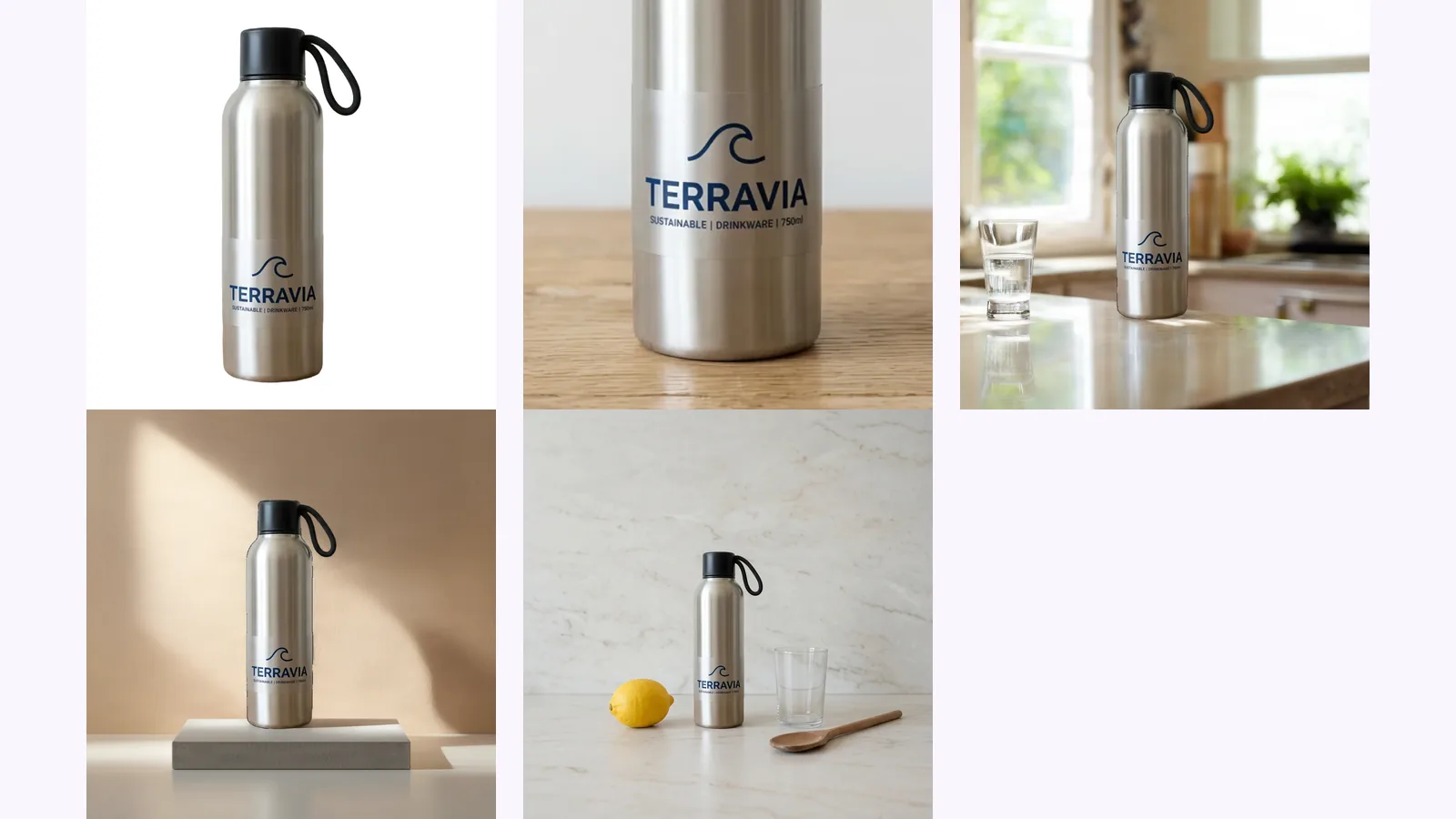
In the close-ups every edge meets plain white with no halo, and there is no shadow under the bottle's base or the mug's base. The edges are slightly soft, because these are enlarged from small files. At the handle join of the mug there are a few small bright specks, which look like small rendering artefacts. The bottle's label stayed legible at full size: TERRAVIA with its wave icon and the line "SUSTAINABLE | DRINKWARE | 750ml".
The mug in this post went through the earlier Amazon listing set flow, which we tested in September 2026. The app has since replaced it with the Product photoshoot, whose main image is a pure-white JPEG, square, 1,000–2,000 px, cut out of your own photo, with the product filling about 87% of the frame. The product is never redrawn, and the app runs its own main-image checks on it, passing a fill of 85–95% of the frame. That is not Amazon's review and no substitute for your category's style guide. On our mug run the file was 1,000 by 1,000 px, with the mug at 88% of the width and 84% of the height; we have not re-measured the Product photoshoot's files.
Around the main image, the Product photoshoot for Amazon listings now makes up to 8 scenes from the same photo, at 1 credit per image, and your first Product photoshoot set (the white main image plus 4 scenes) is free, once per account. Pass the main image through the eyedropper steps above like any other file. For what happens between your upload and the download, see how a MultiAngle set is generated.
Make a white main image from one photo
No. The rule Amazon gives is pure white, RGB 255, 255, 255, and its staff have said black is not allowed either. A light grey that looks nearly white still measures well below 255. Check the background with a colour picker.
Amazon's guide says the product should fill 85% or more of the frame and doesn't publish how it measures that, so we can't say which. It matters: our mug main image measures 88% wide and 84% tall. Fill the frame so the product's longest side is well over 85% of the frame, then check the listing after it goes live.
Seller guides that summarise G1881 say the main image shows the product alone, and some categories allow a model. We couldn't read G1881 without signing in, so check it and your category style guide. Hands and people fit more safely in the secondary images, which our guide to Amazon lifestyle images covers.
Amazon's guide lists PNG as an accepted format, but the rule is about the background colour, and transparent is not white. Flatten the image onto a pure white 255 canvas yourself, so you know which pixels are being judged, and measure it.
Some categories set the angle, and a generated 3/4 view still has to match the real product. See product photography angles for which view leads, or make the other views with the product turnaround template, and measure the white background the same way.
More on this topic: Product photoshoot for Amazon listings and Amazon Listing Image Guides.
Amazon size chart image and what's in the box image: what to measure, cm and inches, how to label each, and what Amazon's own posts say to show.
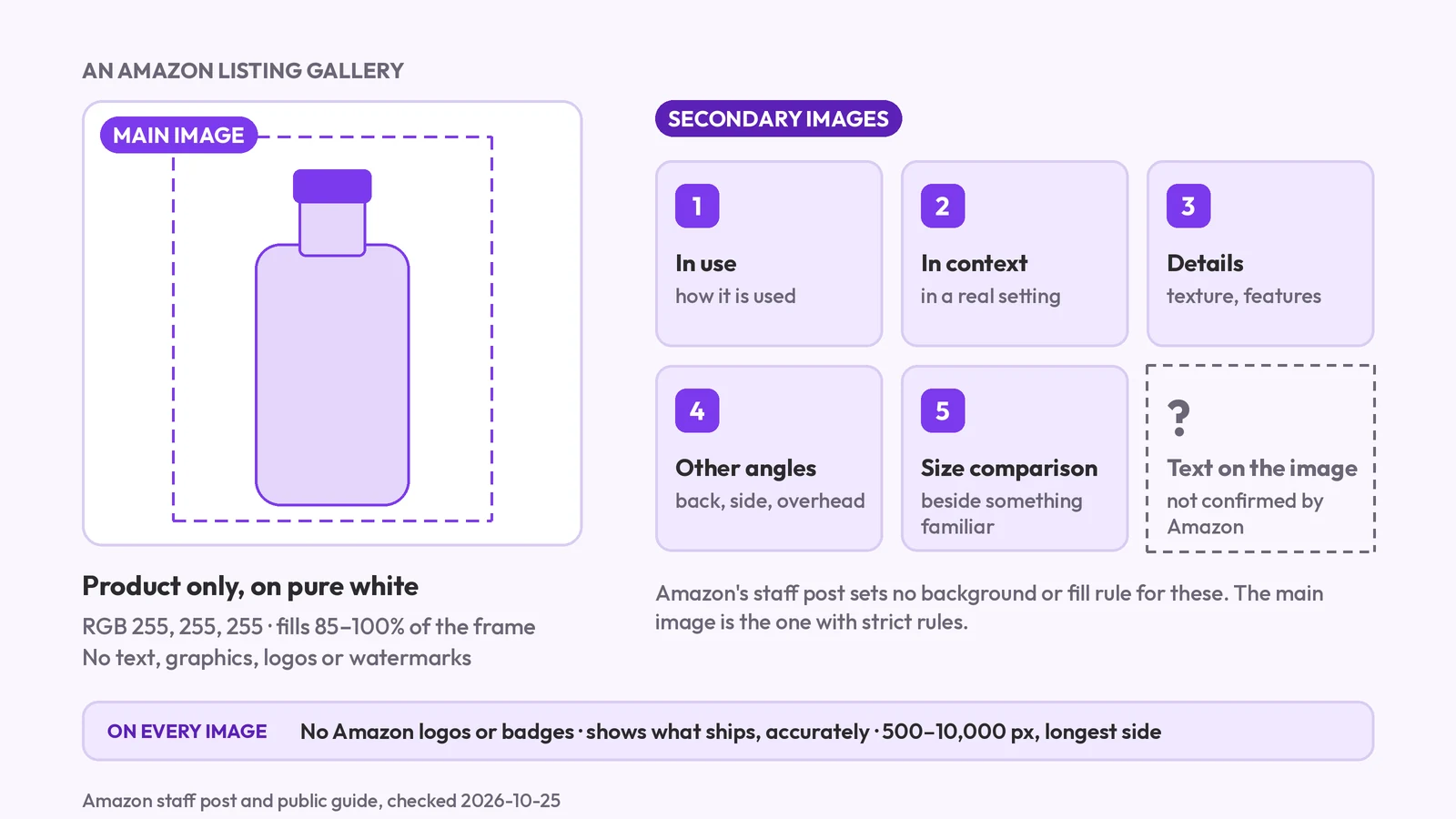
Amazon's main image must be pure white with no text; secondary images are looser. What each slot may show, the AI-people tag, and what we couldn't confirm.
Amazon lifestyle images explained: the in-use, styled and scale scenes, whether AI scenes are allowed, the AI-people tag, and how to check the label survived.