8 product photography angles and which to skip
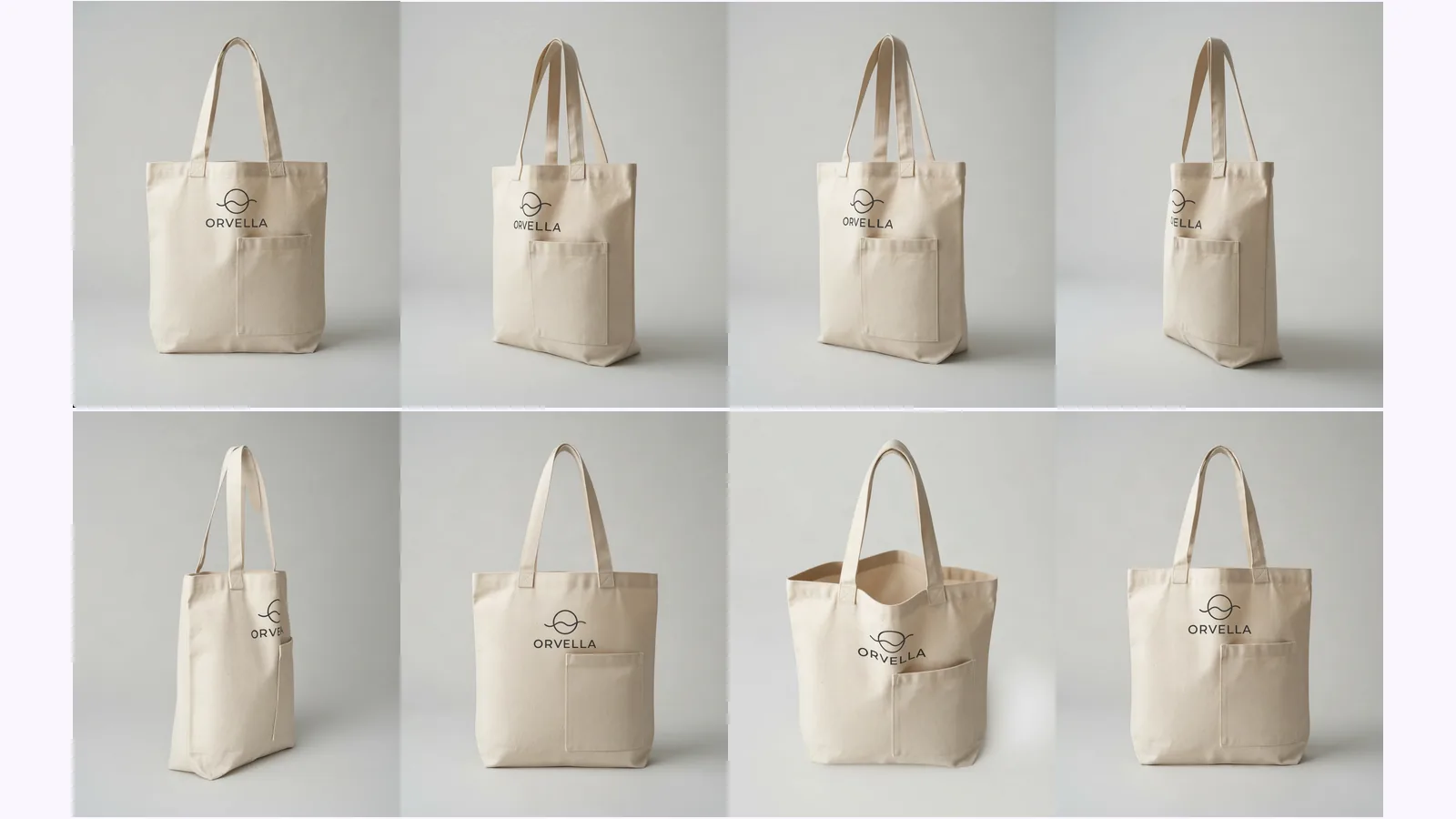
What each shot answers, which to skip by product type, and where AI-made views drift. Shown on one tote, with a pick table for bottles, shoes and bags.
Etsy product photo tips as a slot-by-slot plan: what to show in each photo, the size Etsy staff recommend, and where generated angles fail on handmade items.
These Etsy product photo tips come down to a slot plan. Photo 1 is the thumbnail, so make it a centred front or 3/4 view on a plain background. Photos 2 to 8 answer one buyer question each: sides, back, detail, scale. Etsy allows up to 20 photos and 2 short videos per listing, but about ten well-chosen shots cover most items. You can get the standard views of a product from one photo for the shape shots and photograph the rest.
Key takeaways
Up to 20 photos and 2 videos, each video 5 to 15 seconds long, according to Etsy Help's page on creating a listing (checked 2026-09-26, read from a search snippet). Some guides still say 10; the Etsy Help text in that snippet says 20.
We could not open that page ourselves and did not test anything on Etsy, so open the help page and check the current limits before you plan around them.
You do not have to fill them. Buyers cannot pick the item up, so the photos have to answer their questions: how big, what is the back like, what does the detail look like up close, what will arrive. About ten shots answer those for most items. Past that, add colour variants, a process shot or a short video.
At least 2000 px on the shortest side, at 72 PPI, in JPG, GIF or PNG. That is the recommendation of Etsy staff in the community announcement about listing image size and ratio (Etsy Community, "We're making updates to size and ratio for listing images", checked 2026-09-26). The same post says Shop Home shows a square crop, and the crop tool offers square and rectangular options.
That is why the item should sit in the middle with room around it. If a square crop cuts a handle or a corner, the thumbnail looks wrong in some places and right in others.
We did not open Etsy's listing editor, so we can't say which crop ratios it offers today. Check the crop tool before you finalise slot 1.
MultiAngle's outputs are 1K on Free and Creator and 2K on Pro and Studio, with a 4K upscale at 1 credit per image (3840 px on the long edge). Check the pixel size of what you download against Etsy's 2000 px recommendation before you upload. Etsy's sizes next to Amazon's and Shopify's are in product image sizes compared, and when a 4K upscale helps covers the export.
The thumbnail is the one every shopper sees, so it is photo 1. Make it the front or a 3/4 view, centred, on a plain background, with the item filling most of the frame but not touching the edges. Items with depth, such as mugs, bags and shoes, often read better at 3/4 because it shows two sides at once. Our guide to the 8 product photography angles explains what each view is for.
We planned the slots around one made-to-order item: a glazed ceramic mug with a hand-painted blue wave and dots. The mug is an image made with Google's Nano Banana (not a photo of a real mug), so we have no physical mug to check it against. Here is the input.
What a reader needs to check the generated views against: the glaze is a warm cream with fine brown speckles. A pale glaze drip hangs from the rim near the handle. A blue wave runs around the middle with a dot above or below each crest, and the handle is on the right.
MultiAngle's Product turnaround made the other views from that image. The set is 8 views, your upload included: front, 3/4 left, 3/4 right, left side, right side, back, above and below.
What we saw, view by view:
Which would we publish? The front, both 3/4 views and Above, after a check. We would hold the back and the side with no handle until we had compared them with the real mug, because of the glaze drift below.
Here is the plan, with what each slot answers and who takes it:
| Slot | Shot | Question it answers | Take it yourself or generate |
|---|---|---|---|
| 1 | Front or 3/4, centred | What is it? | Your real photo or a generated 3/4 |
| 2 | 3/4 left | What shape is it? | Generate, then check |
| 3 | 3/4 right | Is the other side the same? | Generate, then check |
| 4 | Left side | What is the handle or edge like? | Generate, then check |
| 5 | Right side | Is anything on this side? | Generate, then check |
| 6 | Back | Is there anything on the back? | Generate only if the back is plain; otherwise shoot it |
| 7 | From above | What is the inside like? | Generate, then check |
| 8 | Detail close-up | What does the glaze or the pattern look like up close? | Shoot it yourself |
| 9 | In the maker's hand | How big is it? | Shoot it yourself |
| 10 | Packaging | What will arrive? | Shoot it yourself |
The view from below is left out of the ten, because few buyers need a mug's base. Swap it in for items where the underside matters.
Slots 11 to 20 are optional. Use them for colour and size variants, a process or workshop shot, a size chart, and a still from a video. Etsy's two video slots take 5 to 15 seconds. MultiAngle makes still images only and does not export video.
For made-to-order items with a consistent design, generated angles can save a shoot, as long as every view matches what you ship. For one-of-a-kind items, photograph the real object. A generated view is the model's best reconstruction of sides it never saw, which is fine for a mug in a standard glaze, and not fine as a record of a particular piece.
Whether Etsy's rules allow generated images, and what you must disclose, is not something we will paraphrase from other sites. We did not read Etsy's pages for this post and did not upload anything to Etsy. Some sources say Etsy requires disclosure for any AI imagery and others say only for AI-made items, and they conflict. Read Etsy's own pages before you list, and check them for today's wording: Etsy Creativity Standards, the seller handbook article What is Etsy's stance on AI creations?, and the House Rules on Listing Image Requirements. If you are choosing between ways to get extra angles at all, we compared prompting, sliders and fixed sets in how to get different angles of the same image with AI.
This section is long on purpose: a one-of-a-kind handmade piece is where a generated view is hardest to check.
Here is what we could check on the mug. We have no physical mug, so the back of this one cannot be checked against anything. The side we can check is the front.
The front-side pattern held up. In the generated near-front view the wave and every dot sit within about a dot's width of the input's, and even the pale scuffs on the wave are there. That is a favourable result, and it is one view of one mug.
The glaze did not hold as well.
The input's glaze is warm cream with many fine brown speckles. The back view is paler with almost none in the crop, and it has two sharp V-shaped drips at the rim, sharper than any drip in the input. The side with no handle is the whitest and coolest of the set, with only a few speckles. The side with the handle is closest to the input. A hand-glazed piece has its own drips and speckles on every side, so a generated side is a guess about them, and a buyer who sees a whiter mug in photo 5 than in photo 1 may feel misled.
The product turnaround template makes the views, and how it works shows what happens between upload and download. The AI product photography guide covers what to shoot yourself, and the e-commerce use case shows where the template fits a shop. If you also sell on other marketplaces, the Amazon image rules differ: the main image there has to be on pure white. More product guides are under product photo guides, and the FAQ covers credits and accounts. MultiAngle pricing lists the plans, from $19/month.
Make every angle of your item from one photo
Etsy staff say Shop Home shows a square crop and the crop tool offers square and rectangular options (checked 2026-09-26). Keep the item centred with a margin so either crop works. Confirm the current ratio in the listing editor.
Within a listing, yes for the main views: a shared background makes the photos read as one item. Use a different background for the lifestyle and in-use shots on purpose, so buyers see context and not a second item.
We will only point to Etsy's own pages, and we have not read them for this post. Read Etsy's Creativity Standards and the seller handbook article on AI before you list, and check their current wording. Do not rely on third-party summaries.
Etsy allows 2 videos of 5 to 15 seconds per listing. We have not measured what a video does for sales, so we make no claim. MultiAngle makes still images only; a video has to be shot separately.
More on this topic: Product photos from every angle and Product Photography Angle Guides.
What each shot answers, which to skip by product type, and where AI-made views drift. Shown on one tote, with a pick table for bottles, shoes and bags.
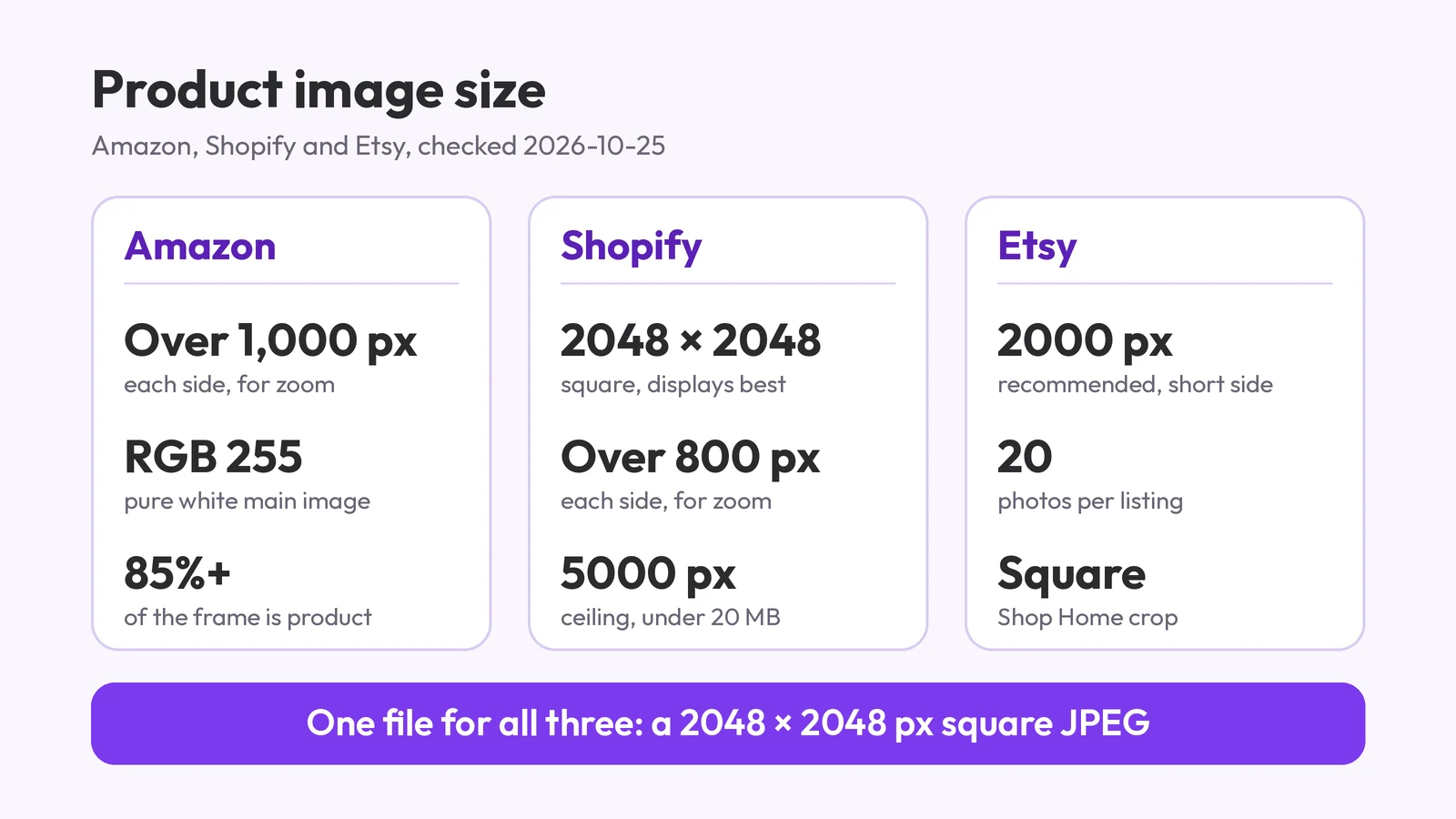
Product image size for Amazon, Shopify and Etsy in one dated table: pixels, ratio, formats, photo counts, and the one 2048 px square JPEG that fits all three.
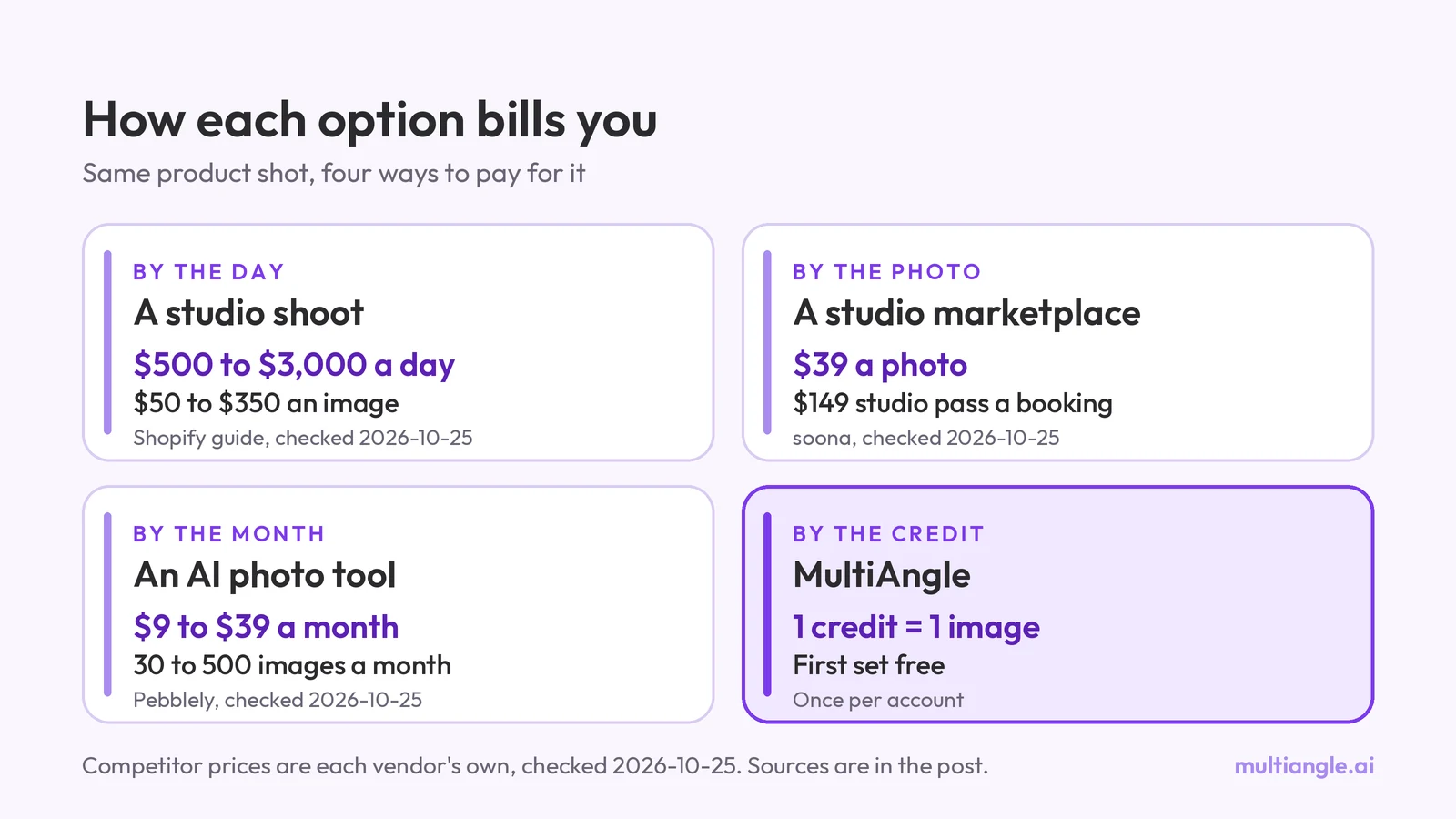
AI product photography cost against a studio shoot, with dated prices: $50–$350 an image at a studio, AI tools from $9 a month, and what credits cost.